
My Library Account
Last Updated: July 21, 2026 | Provide Feedback
Learning Outcome
After using this tutorial, you will be able to locate your library account, log in, and view and renew materials that you have checked out.
Library Account Guide
Use the dropdowns below to learn how to navigate your George Mason University Libraries account.
Logging in
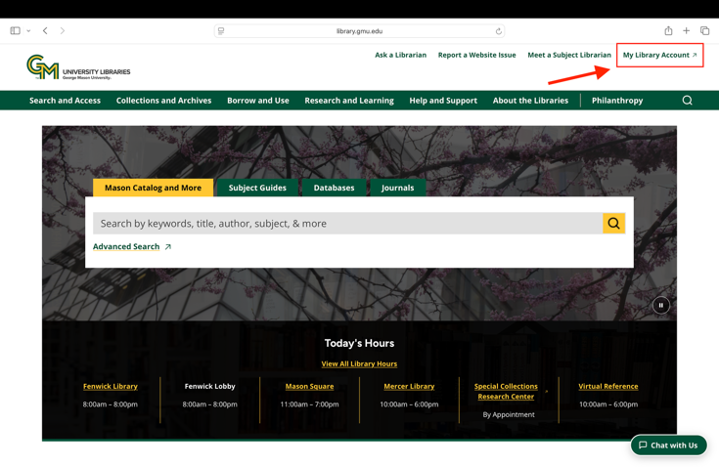
From the library’s website, select My Library Account in the upper right-hand corner.
- Select either “Mason Students, Faculty, and Staff (CAS)” or “Affiliates” depending on your affiliation with George Mason.
- George Mason students, staff, or faculty members will be prompted to sign in using their NetID and the same password used for signing into their George Mason email or Canvas account. Affiliates will be prompted to sign in using their User ID and password. Two factor authentication may be required.
Selecting an institution
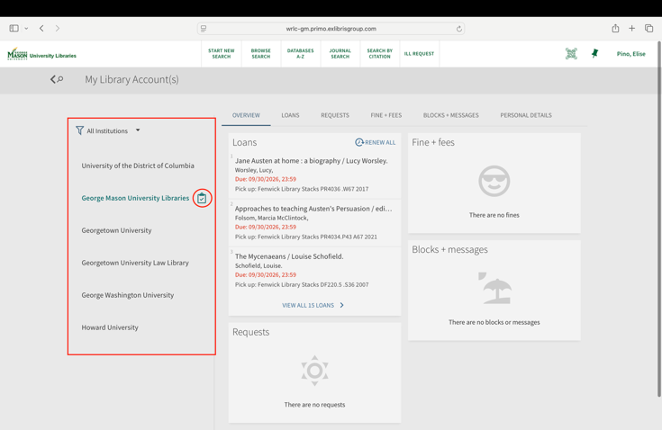
With the Institution filters on the left side of the page, you can view information related to materials checked out from George Mason and each of our WRLC partner institutions. By default, you will be in the view for George Mason University when you open the page. Any institution that has activity will display a clipboard icon with the alt text “Has activity.”
Overview tab
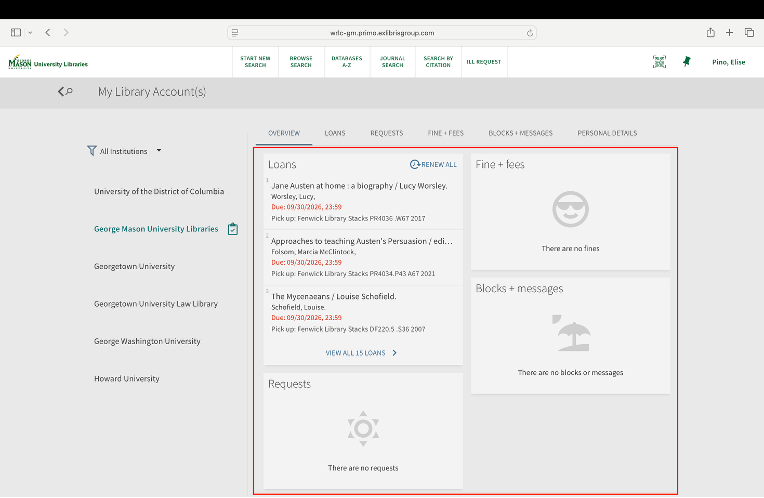
The Overview tab of My Library Account(s) is the first tab that loads when you log in or select an institution. This shows us a summary of the account’s activity, with currently checked out materials under Loans, fine balances under Fine + fees, the status of hold requests under Requests, and any blocks or messages on the account under Blocks + messages.
Loans tab/Renewing items
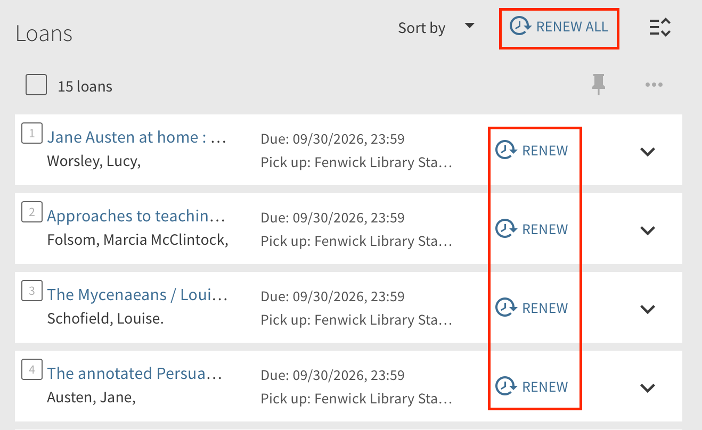
View all checked out items in the “Loans” tab. To renew individual items, click "Renew" beside each item, or select “Renew all” to renew all items.
Request tab/Managing requests
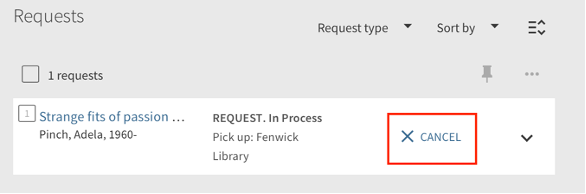
View and manage pending requests for materials from George Mason or its partner libraries in the Request tab. Each title will display the status of the request. Cancel a request by selecting “Cancel” in that item’s row.
Fine + Fees tab
Navigating to the "Fine + Fees" tab provides detailed information about library fines, from George Mason University Libraries or our partner libraries. Pay fines with Mason Money at the circulation desk. For questions about fines or fees, please email info@gmu.libanswers.com.
Blocks + Messages tab
Navigating to the “Blocks + Messages” tab provides information on any blocks or holds on your account and displays any messages sent to your account. Contact info@gmu.libanswers.com with any questions about blocks and messages.
Personal Details tab
Navigating to the “Personal Details” tab provides your account’s personal information, such as your account type. Select “Edit Details” to add or change your contact information, making sure to select “Save Changes” after any edits.

More Resources
If you have questions or need more help, review our other tutorials on library services or reach out to us through Ask a Librarian.

